
Undo History
An in-session timeline of document checkpoints (one per typing burst). Jump back to any recent state from a filterable popup (M-g v) or the tool window (M-g u).
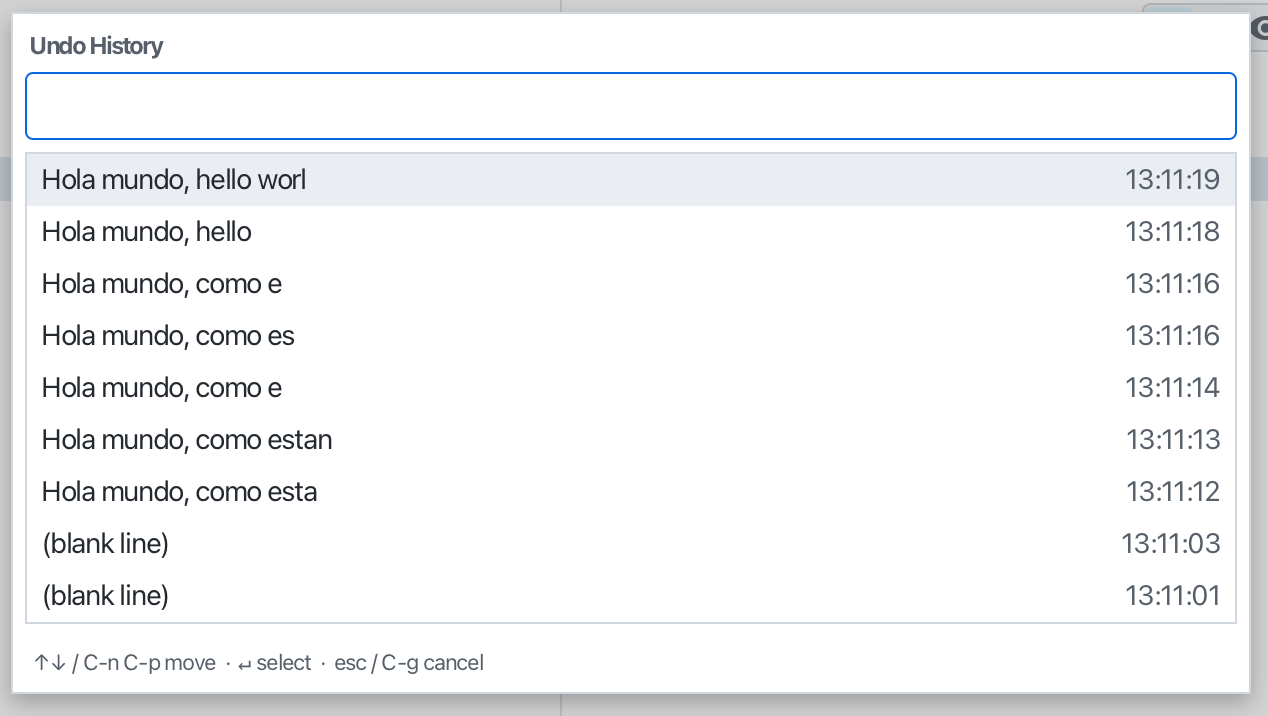
Editora keeps an in-session timeline of checkpoints as you edit, one per typing burst, finer-grained than save-based Local History.
- The popup (
undoHistory.jump,M-g v) lists the active buffer’s checkpoints, each with a caret-line preview and capture time, and filters as you type. Pick one to jump back to that state (a single undoable restore). It’s the fast, keyboard-driven path. - The Undo History tool window (
M-g u) shows the same timeline; double-click or Enter to jump back.
It’s session-only and disabled for very large files. The tool-window stripe is off by default (the popup is the primary entry point); enable it in Settings → Tool Windows if you want it docked. This complements the word/line-level undo granularity, where one undo (C-/, or Ctrl+Z in the other keymaps) undoes a word or line rather than a whole burst.