
Emacs heritage
The Emacs editing model, not just its keybindings: a kill ring and a mark ring, C-x r rectangles, narrowing, query-replace, C-u prefix arguments, and structural sexp motion. Emacs is the default keymap.
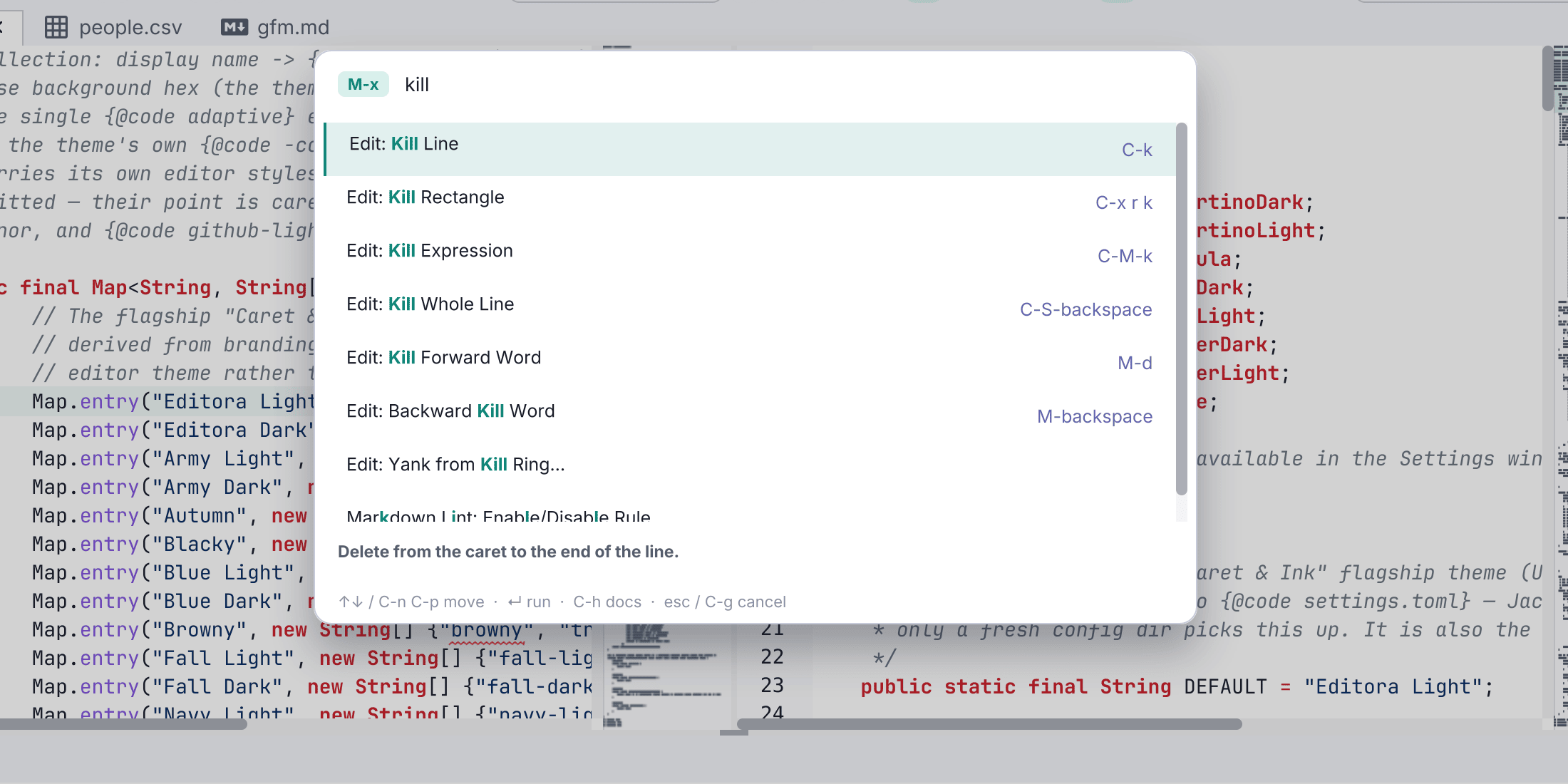
Plenty of editors ship an “Emacs keymap” that maps a handful of chords onto their own commands. Editora implements the model underneath: the concepts an Emacs user reaches for without thinking, built as real features rather than shortcut aliases. Emacs is the default keymap, and everything here works in the other four too, through the palette or a binding of your own.
Killing and yanking
A real kill ring, not a clipboard with extra steps. It holds the last 120 kills (Emacs’ own kill-ring-max), consecutive kills accumulate into one entry, and the ring is shared with the system clipboard in both directions, so text copied in another application is yankable and a kill is pasteable elsewhere.
- C-k kill line, M-d kill word, M-DEL backward kill word, C-S-DEL kill whole line
- M-z zap to char, C-M-k kill sexp
- C-y yank, M-y yank-pop to cycle back through the ring
The mark
- C-SPC sets the mark, C-x C-SPC pops back through the ring, C-x h marks the whole buffer.
- The ring is per buffer, as in Emacs, and marks are tracked through edits: type above a mark and it stays on its text rather than its old offset.
Rectangles
The full C-x r family over the columns between point and mark: kill, copy, yank, delete, clear, open, string-rectangle, and number-lines. Each is a single undo step. Note these are character columns, so a tab counts as one, and rectangles are distinct from the Alt-drag multiple-cursor selection.
Narrowing
C-x n narrows to the region, the current defun, or a fold region, and widening restores everything. It is true narrowing: search, replace, Select All and macros all see only the region, which is the point of it. Writing the file still writes the whole file.
Search, replace, and motion
- C-s / C-r incremental search, repeating the chord to cycle matches.
- M-% query-replace and C-M-% query-replace-regexp, with the usual
y,n,!,.andqanswers. - M-s o occur, listing every match in the buffer.
- C-M-f / C-M-b move by sexp, C-M-SPC marks one, and C-M-a / C-M-e jump to the start and end of a defun.
- M-g j and M-g L jump to any visible character or line by typing its label, in the spirit of avy.
Prefix arguments
C-u takes a numeric argument the way Emacs does: C-u 5 C-n, C-u 40 - to type a row of dashes, C-u C-SPC to pop the mark. It is a repeat model rather than a full numeric argument, so a negative argument does not reverse motion and C-u 0 specials are not honoured.
Keyboard macros
The C-x (, C-x ), C-x e habit, on the function keys: F3 starts recording, F4 stops, C-x e replays. Recording captures the interleaved stream of commands and literally typed characters, so a replay reruns the same auto-indent and auto-close behaviour a human keystroke would, rather than pasting text in.
Past that it goes somewhere Emacs needs a defun to reach. A macro can be named and saved, it persists across sessions, and each saved macro becomes a command of its own, so it shows up in the palette and can be bound to a key in Settings like anything else. There is also a replay-N-times prompt, and a run-saved picker. See keyboard macros.
M-x, and a palette that explains itself
M-x does what you expect: fuzzy-match a command by name and run it. The difference is what the list can tell you, because every command is a registered object with an id, a title and a description rather than a symbol you have to already know.
- Each result shows its description and its current keybinding, so the palette doubles as the way you learn the chords.
- A command that cannot run right now is still listed, greyed out, and says why: the feature is switched off, or there is no file open, or you are not in a git repository. It points at the setting that would enable it instead of failing silently.
- The same list drives keybindings and the toolbar, so the palette can never drift out of step with what the editor can actually do.
The rest of the muscle memory
Transpose (C-t, M-t, C-x C-t), fill paragraph (M-q) with a fill column and optional auto-fill, case commands (M-u, M-l, M-c), whitespace and line surgery (**M-**, M-SPC, C-x C-o, C-o, M-^), comment-dwim (M-;), abbreviations (C-x a e, C-x a g), and C-g to back out of anything.
What we don’t copy
Some of Emacs is inheritance, and some of it is a different philosophy that Editora deliberately does not follow.
- No Elisp, and no editor-as-operating-system. Emacs answers “can it do X?” by reimplementing X in Lisp. Editora answers it by running the tool you already have: your
git, yourripgrep, your language servers. Extension is through plugins and the command system, so nothing here replaces a tuned Emacs configuration, and it is not trying to. - Discoverability is not opt-in. Emacs rewards knowing the name of the function. Here every action carries a title and a description, Settings is a real window with checkboxes, and the palette explains why something is unavailable. You should not need to have read the manual to find a feature.
- Emacs is a default, not a requirement. Four other complete keymaps ship (CUA, Sublime, VS Code, IntelliJ), and any command can be rebound. Nobody is asked to convert.
- Modern window conventions. Tabs, tool windows, a project tree, drag and drop, and a working mouse, rather than the Emacs buffer and window model.
Not yet
Registers, a global cross-buffer mark ring, and dabbrev are genuinely missing rather than rejected. A few of the ports are also approximations, and the page says so where it matters: C-u repeats rather than passing a true numeric argument, and rectangles count character columns rather than display columns.
Browse the full command list or the keybindings reference.