
Server log viewer
Open a log file for severity highlighting, a tail -f Follow button that survives rotation, open-at-the-tail for huge logs, and live level + regex filtering.
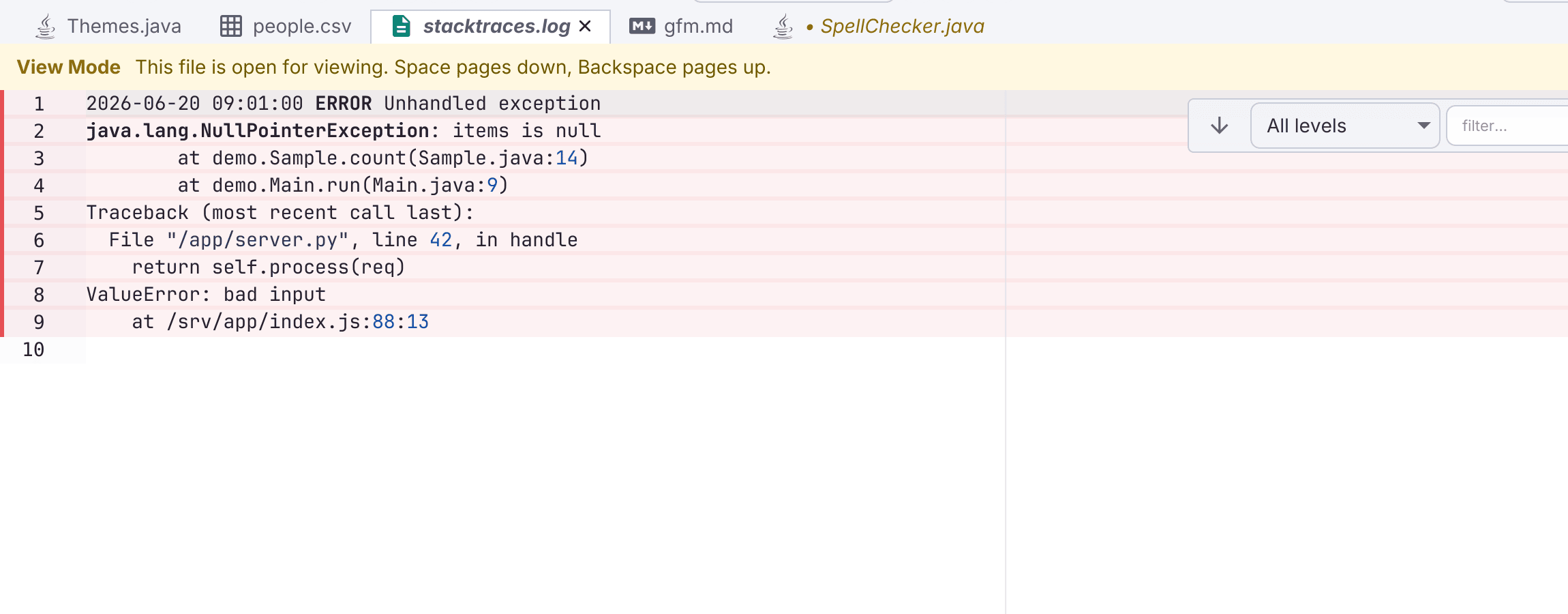
.log files open in a dedicated log mode built for reading server output. So do rotated logs (app.log.1), access_log, syslog, catalina.out, nohup.out, and files such as server.out whose content looks like a log.
- Severity highlighting: FATAL / ERROR / WARN / INFO / DEBUG / TRACE, both inline and as a left-edge bar that works even on huge logs. It recognizes Logback/Log4j,
java.util.logging, syslog, nginx, structured/JSON, zerolog, .NET, klog, pino/bunyan, and access logs. - Follow (
tail -f): a Follow button in the bar above the log streams new lines as the file grows and auto-scrolls. It keeps going when the log is rotated. Very large logs open at the tail (read-only at the end). - Live filtering: filter as you type by a level floor and a regex (or a literal substring when it isn’t valid regex). A filter keeps or hides whole records, so a matched line brings its stack trace, lines keep their real numbers, and the bar shows how many are showing (“65 of 185 lines”).
Logs open in View mode (read-only with an Enable Editing banner) by default, and follow keeps streaming while read-only. On by default (Settings → Editor → Logs). Commands: log.toggleFollow, log.setLevelFilter, log.setRegexFilter, log.clearFilter, log.focusFilter, log.viewAsLog, and view.toggleLogViewer. See the log viewer guide.