
Languages & highlighting
Syntax highlighting
Highlighting uses TextMate grammars through tm4e. When you open a file,
Editora maps its extension (or, for a Dockerfile, its name) to a bundled
grammar and tokenizes the document line by line. Tokenization is stateful,
so block comments and heredocs highlight correctly across lines, and
incremental, so an edit re-tokenizes only from the changed line, off the UI
thread. Token colors come from the active editor theme.
Files without a bundled grammar are left unstyled rather than guessed at.
Long lines are coloured only while that stays cheap. A line of 2,000 characters or more that splits into more than 400 tokens, or that does not finish within the half second a highlighting pass gives long lines, is shown as plain text, with its brackets uncoloured. A long comment, string or Markdown paragraph has few tokens, so it keeps its colours. A language server’s semantic colours are not drawn on lines of 2,000 characters or more, and a line over 20,000 characters is never highlighted. Files that are mostly long lines open in View Mode.
Supported languages
Editora ships 64 grammars:
| Group | Languages and file types |
|---|---|
| JVM | Java, Kotlin, Groovy (and Gradle build files), Scala (and sbt and Mill builds), Clojure (and EDN) |
| Systems | C, C++, C#, Go, Rust |
| Scripting | Python, Ruby, PHP, Lua, JavaScript, TypeScript, JSX and TSX |
| Shells and builds | Bash and other shell scripts, PowerShell, DOS batch, Makefile, justfile |
| Web and documents | HTML (and HTML templates), CSS, Astro, XML and its dialects, Markdown, Typst |
| Data and config | JSON, JSON Lines, YAML, TOML, INI, Java .properties, CSV and TSV, .env, SQL, GraphQL, Protocol Buffers, Terraform and HCL, Dockerfile, pip requirements.txt |
| Diagrams and requests | Mermaid, Markwhen, Graphviz DOT, PlantUML, .http request files |
| System files | systemd units, desktop entries, crontab, Caddyfile, /etc/hosts, fstab, SSH config, Git config, .gitattributes, .gitignore and the other ignore files, Debian control files and changelogs, APT sources, network interfaces, log files, diffs and patches |
Two more work inside these: one for Javadoc comments, and one for the HTML in
a Markdown file. JavaScript uses the TSX grammar, so JSX in a .js file highlights.
XML covers its dialects too: DTDs (.dtd, .ent, .mod), RELAX NG,
XSL-FO, Schematron, MSBuild and NuGet project files, .resx, XAML, XLIFF,
property lists, KML, GPX, DITA and others open as XML (the full list is under
XML). DTD declarations (<!ELEMENT>, <!ATTLIST>,
<!NOTATION>, like <!ENTITY>) are highlighted in a DOCTYPE and in a DTD
file. A go.mod stays plain text, and .xhtml is HTML. A .mod, .sch,
.props, .targets or .fo file is XML only when its text starts with <,
so a Modula-2 module or a KiCad schematic opens as plain text.
JSON Lines files (.jsonl, .ndjson, .jsonlines) hold one JSON value per
line. Each line is coloured as JSON, and a line that is not exactly one JSON
value (a trailing comma, two records on one line, a record split over two
lines) is underlined with what is wrong. JSON Lines is in File ▸ New, and a
jsonl fence in Markdown is coloured too. The preview is under
Smart file previews.
The status bar and the Problems window write each language’s name as it is usually written: XML, JSON, YAML, HTML, CSS, SQL, TOML, C++, C#, GraphQL, PowerShell, and Plain Text for a file with no language.
HTML templates use the HTML grammar: Jinja, Nunjucks, Twig, Liquid, Mustache,
ERB and EJS files open as HTML Template, and .hbs / .handlebars files
as Handlebars, with Editora’s HTML tag editing, folding and Structure. A
template named after the file it renders (nginx.conf.j2, config.yml.erb)
opens in that file’s language. See HTML.
Astro files use the official Astro TextMate grammar, including mixed
frontmatter, HTML, and CSS regions. The same language integration supplies
Structure symbols and can connect to astro-ls for code intelligence.
Folding, comment syntax, and auto-indent rules are wired per language alongside
the grammar. Many extension-less dotfiles and named config files (e.g.
.editorconfig, .gitignore and other .*ignore files) are matched by name, so
they get highlighting too (and the matching language server when enabled).
When the file name says nothing
A file whose name gives no language (an extension-less script, or a .txt
file) takes it from its own first lines:
- A shebang on the first line:
#!/bin/sh,#!/usr/bin/env bash,#!/usr/bin/env -S bash -e,#!/usr/bin/env -u NAME bash,#!/bin/busybox sh, and the same for zsh, dash, ksh, mksh, ash and Bats, as well as Python (and PyPy), Node, Deno, Bun, Ruby, PHP, Lua, Groovy and PowerShell interpreters, andkotlin,scala,scala-cli(#!/usr/bin/env -S scala-cli shebang),clojure,cljand Babashka’sbb. A version or build suffix is ignored (python3.12, the free-threadedpython3.14tandpython3-dbgare Python), andipython,graalpy,micropythonandpythonware Python too. A Python runner counts too:#!/usr/bin/env -S uv run --script(a script with inline dependencies),pipx run, andpoetry,pdm,hatch,ryeorpipenvrunningpython. Ajavashebang counts when a--source Nfollows it (#!/usr/bin/env -S java --source 25). - A modeline, when there is no shebang Editora knows: a vim modeline in the
first or last five lines (
# vim: ft=sh,# vim: set filetype=bash :), or an emacs line on the first line, or the second after a shebang (# -*- mode: sh -*-,# -*- sh -*-). - An XML declaration, when neither of those names a language: a file that
starts with
<?xml(anAndroidManifest, say) is XML. A.txtor.textfile is never read as XML this way. - An HTML start, when none of those names a language: a file that starts
with
<!doctype htmlor an<html>tag, in either case, after any blank lines and<!-- -->comments, is HTML (a saved page, CGI output). A.txtor.textfile stays plain text.
A shebang typed into a new or extension-less file switches the language once you stop typing. An extension or name that gives a language always wins over both.
To set the language yourself, click the language in the status bar, or run
Buffer: Set Language… (buffer.setLanguage). The choice applies at once to
everything that depends on the language: highlighting, comment syntax, the
status bar, the tab’s file-type icon, the language server, and the
Run ▶ for scripts. It lasts while the file stays open.
Java scripts
A Java file without a .java name, such as an extension-less
java --source 25 shebang script or a file set to Java in the status bar, is
served by the Java language server when it is set up, like a .java
file: completion, hover, the outline and syntax errors.
A completion that adds an import puts it below the #! line, so the script
still runs. The server sees the script on its own, outside any project, so it
reports syntax errors but not type errors, as for any .java file outside a
project. This works for scripts on this machine, not for one in a
remote folder. See Run & debug for running
and debugging one.
Scala and Clojure
Scala files are .scala, Scala CLI and Ammonite scripts (.sc), sbt builds
(.sbt) and Mill builds (.mill). Scala 3’s optional braces are understood:
Enter indents after a line that opens a block (class Shelf:, def f =,
case x =>, if … then, for … do, match, else), and such a block folds
from its first line to the end of its indentation, through its end marker when
it has one. Brace-style Scala 2 code folds on its braces, and a 'symbol
literal is not read as the start of a string.
Clojure files are .clj, ClojureScript .cljs, shared .cljc (and the
older .cljx), EDN data (.edn, including deps.edn and bb.edn), Babashka
scripts (.bb) and Leiningen’s project.clj.
- Comment toggling uses
;;. - Enter and Tab indent the way Clojure is written: a call’s arguments line up
under its first argument, the body of a definition or binding form (
defn,let,when,ns,with-…and the like) sits two spaces in, and the elements of a vector or map line up after the bracket. Tab sets a line to that indent exactly, pulling back a line that is too deep. - Every form that spans lines folds. Brackets inside strings, comments,
character literals (
\() and regexes (#"…") are skipped. - Typing
'or a backtick inserts just that character: they are Clojure’s quote, not string delimiters. - The Structure panel lists the namespace and the top-level
def,defn,defmacro,defmulti,deftest,defprotocolanddefrecordforms, with a function’s parameter vector beside its name.
Both languages have snippets, file icons, Go to Symbol without a language server, and entries in the Project tree’s New ▸ menu: Scala and Clojure under Languages, Scala CLI and Babashka under Scripts.
Shell scripts
These open as shell scripts (bash, zsh, ksh and POSIX sh share one grammar):
- Extensions:
.sh,.bash,.zsh,.ksh,.mksh,.command,.bats,.ebuild,.eclass, and names ending in.bashrc,.zshrcor.profile. - Startup files, such as
.bashrc,.bash_profile,.bash_login,.bash_logout,.bash_aliases,.profile,.zshrc,.zshenv,.zprofile,.zlogin,.zlogout,.kshrc,.mkshrc,.xinitrc,.xprofile,.xsession,.bashrc.localand.zshrc.local, plus direnv’s.envrc. - System copies:
/etc/profile,/etc/bashrc,/etc/bash.bashrc,/etc/zshrcand the files in/etc/zsh/. - Other names: the
mvnwandgradlewbuild wrappers,PKGBUILDandAPKBUILDpackage recipes, and bash-completion scripts (anything in abash-completion/completionsorbash_completion.dfolder). - Any file with a shell shebang or modeline, as above, or a
# shellcheck shell=bash(orsh,dash,ksh,zsh) line in its first 20 lines, such as a sourced.incfile.
The shell grammar is the one VS Code uses, with Editora’s own fixes. Commands,
keywords, variables, quoted strings, here-doc text and comments are coloured; a
command’s bare arguments and options are plain text. Here-docs end at their
delimiter in every form (<<EOF, <<-EOF, <<'EOF', <<"EOF", <<\EOF),
$(( … )) is coloured as arithmetic, the right side of [[ … =~ … ]] as a
regular expression, and the ) that ends a case pattern is not counted by
bracket-pair colorization. zsh files use the same grammar, so zsh-only syntax
such as ${(k)map} stays plain.
zsh startup files (.zshrc, .zprofile, /etc/zsh/zshenv and the like) are
not opened on the Bash language server: nothing in them says they are zsh, so it
would check them as bash and report valid zsh as errors. .zsh scripts stay on
the server. See Language servers for the Bash server, and
Run & debug for running scripts.
Python
.py, .pyw and .pyi files open as Python, and so does any file with a
Python shebang or modeline (see above). The grammar covers current Python:
f-strings with nested quotes and format specs (f"{when:%Y-%m-%d}"), t-strings
(t"Hi {name}"), match and case statements (a match used as a plain name
or call stays a name), type parameters (def first[T](items: list[T]),
class Box[T]:) and the type alias statement. A name after def or class
is coloured as a declaration, including __init__ and a method named like a
builtin (def open), and decorators read as decorators, from @property to
any expression after the @ (@buttons[0].clicked.connect).
Number prefixes and suffixes (0x, 0b, 3j) are part of the number.
Some files open as Python under another name. They get the Python grammar,
# comments, indentation and folding, but no Pyright and no Run:
- Starlark (Bazel, Buck and Tilt build files):
.bzland.starfiles,BUILD.bazel,WORKSPACE.bazel,MODULE.bazel,Tiltfile, andBUILDandWORKSPACEspelled in capitals (a lower-casebuildis left to the shell). - Cython:
.pyx,.pxdand.pxifiles.
SCons build scripts (SConstruct, SConscript) and a Python startup file
(.pythonrc, .pythonstartup) open as Python itself.
Without a language server, Python files still fold by indentation
and get sticky scroll (see Editing), the Structure tool
window lists classes, functions and methods nested by indentation, and
Go to Symbol in Project finds
them across the project. Structure also lists the names a module or a class body
assigns: a name in capitals as a constant, other module names as variables, and
class-body names as fields. Names assigned inside a function or a block are
left out. A def’s row carries a small marker for the kind of def it is, with or
without a server: async, property, classmethod, staticmethod,
abstract, setter, deleter or overload, read from the async keyword and
the decorators above it.
The other files of a Python project open with a format too:
- pip requirements:
requirements.txtand its variants (requirements-dev.txt,dev-requirements.txt,requirements.in,constraints.txt, files ending in.pip, and any.txtor.infile in arequirementsfolder). Package names, extras, version specifiers, environment markers, the-r,-cand-eoptions and URLs are coloured, Toggle Comment uses#, and only comments are spell-checked. - TOML:
Pipfile,poetry.lock,uv.lockandpdm.lock. - JSON:
Pipfile.lockand Jupyter notebooks (.ipynb). A notebook opens as its JSON text; there is no notebook view.
JavaScript and TypeScript
.js, .mjs and .cjs files open as JavaScript, .jsx as JSX, .ts,
.mts and .cts as TypeScript, and .tsx as TSX. JavaScript, JSX and TSX
share one grammar, so JSX markup is coloured in a plain .js file too. VS Code
workspace files (.code-workspace) and Bun’s text lockfile (bun.lock) open
as JSON.
Without a language server:
- Folding. Braces fold in every JavaScript and TypeScript file. In
JavaScript, JSX and TSX files, parentheses that span lines fold too (a
return (…);block or a wrapped call), and so does every JSX element written over several lines, from its opening tag to the closing tag at the same indent. - Structure. The Structure window lists functions, classes and methods, and
top-level constants whose value spans lines, such as
const routes = { … }. An assignment likemodule.exports.formatBytes = …is listed by its name. - Go to Definition resolves a name by scope. A
parameter, a local
const,letorvar(destructured ones too) or acatchbinding goes to its declaration in the enclosing scope, and an imported name goes to itsimportline. Only a name no enclosing scope declares falls back to the file’s top-level declarations and the symbol index. - Related File pairs a TypeScript source with the JavaScript compiled from
it and its declaration file:
util.ts,util.jsandutil.d.ts(and the.mts/.mjs/.d.mtsand.cts/.cjs/.d.ctsfamilies). A.tsxfile pairs with the.jsxof the same name. See Go to Related File. - Editing. Toggle Comment writes
{/* … */}in JSX markup, and Enter after an opening tag indents one level (see Editing). A new file indents with 2 spaces. - Spell check reads the text between JSX tags as well as comments and strings.
Autocomplete
Completion appears as you type, debounced and kept off the hot path. Java member
completion triggers immediately after ., while identifier completion begins
after a short pause. Other word completion won’t trigger below a two-character
prefix.
- Code buffers get a popup that merges sources and ranks them: language-server
results (when LSP is on), then snippets.
Press Enter or Tab to accept. Every item the server sends is listed
(
os.in Python lists all of the module’s members). While a slow server is still answering, the popup shows a row that names it, such as Waiting for Pyright…, after a moment. Complete result lists filter locally and obsolete server requests are cancelled as you keep typing. Accepting a snippet starts a tab-stop session; accepting a Java LSP item can safely add its import after continued typing, grouped with the completion as one undo/redo action. - Prose buffers (plain text and Markdown) get inline ghost text, a muted suffix you accept with Tab.
Trigger manually with C-M-i or M-/. Completion also fires on a language
server’s advertised trigger characters, so < in HTML or : in CSS pops the
popup. In the popup, Up / Down and C-n / C-p move the selection, and
Esc or C-g dismisses it.
The code popup is IntelliJ-style: per-kind icons (class, method, keyword,
snippet, and so on), the matched characters highlighted, deprecated items struck
through, and a documentation popup beside the list. The docs popup shows
automatically and toggles with C-q (Edit: Toggle Completion Documentation).
It widens to fit a long signature, and narrows beside the list where the screen
is tight.
Toggles live in Settings → Code Completion: a master switch plus per-source switches
for words (prose), snippets, and Mermaid keywords. Palette equivalents are
view.toggleAutocomplete and the per-source variants.
Spell checking
Misspelled words get a red wavy underline. Right-click for suggestions (pick one to replace), Add to Dictionary, or Ignore. Ignore stops flagging the word in every open file until Editora is closed; Add to Dictionary keeps it for good.
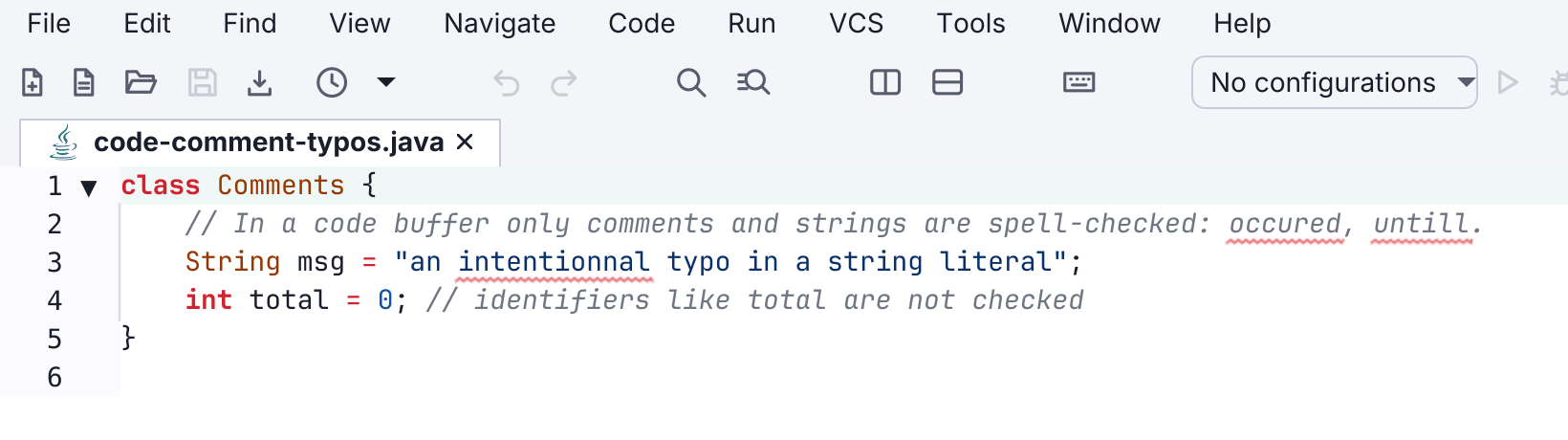
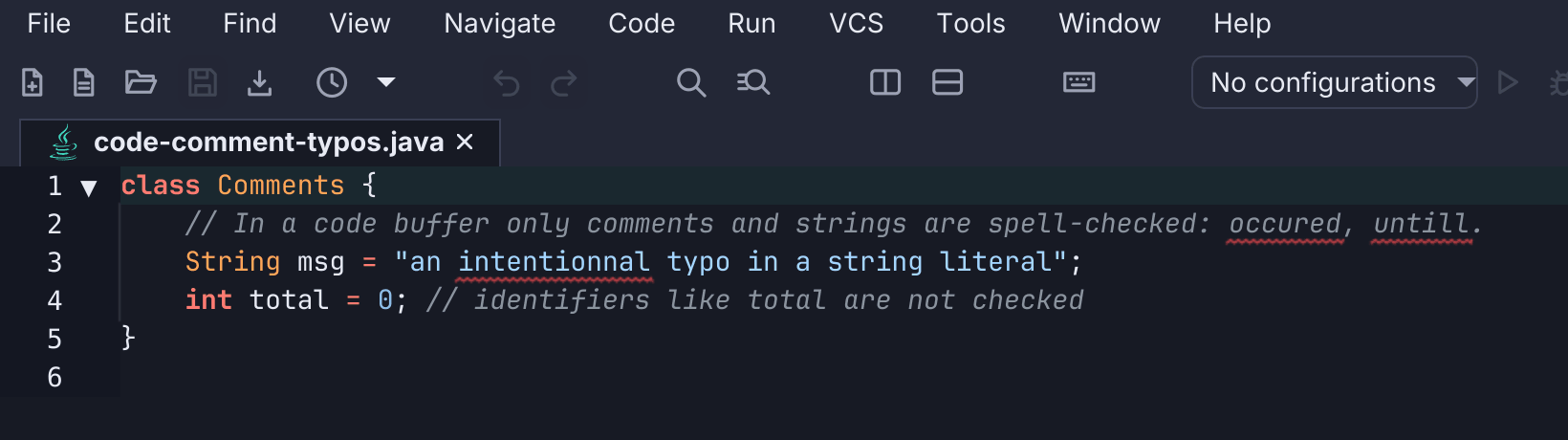
What is checked depends on the file type:
- Plain text and Markdown are checked in full, apart from inline code and link addresses; in Markdown, fenced code blocks, front matter, link definitions, HTML tags and lint directives are skipped too, while link text and image alt text are checked.
- HTML (and HTML templates) has the text visitors read checked, plus
comments and the
alt,title,placeholder,aria-labelandaria-descriptionvalues. Tags, other attributes and the content of<script>,<style>,<pre>,<code>,<kbd>,<samp>and<var>are left alone; the rest of a line that holds an inline<script>is still checked. Template expressions and tags ({{ }},{% %},<% %>) are left alone too, intitleandaltvalues as well, and so are tag names mentioned in comments. See HTML. - Typst has the document’s text checked, plus comments. Typst math and
lines that open with a
#instruction are left alone. - Source code has only comments and string literals checked, so identifiers
aren’t flagged. In shell scripts a command’s bare arguments and options
(
pipefail, package names,-xzf) are not checked; quoted strings, here-doc text and comments are. In Python the first word of a prefixed string (f"…",rb'…') is checked like the rest, without its prefix, and in a pip requirements file only the comments are checked. In JavaScript, JSX and TSX the text between JSX tags is checked too. - Data and configuration formats are off by default: JSON, JSON Lines, YAML, TOML, XML,
CSV, INI, properties,
.env, Git and SSH configuration, system configuration files, logs, and diffs.
Settings → Spell Check → File Types has a tick box per file type, and Spell
Check: Toggle for This File Type (spell.toggleForLanguage) flips the active
file’s type. view.toggleSpellCheck turns checking on or off everywhere.
Spell-check commands
Everything on the right-click menu is also a command, so you can work through a file from the keyboard.
| Action | Command | Emacs key |
|---|---|---|
| Next misspelling | spell.nextMisspelling | (palette) |
| Previous misspelling | spell.previousMisspelling | (palette) |
| Correct the word at the caret | spell.correctWord | M-S-4 (M-$) |
| Add the word at the caret to the dictionary | spell.addWord | (palette) |
| Ignore the word at the caret | spell.ignoreWord | (palette) |
| Set the file’s dictionary | spell.setLanguage | (palette) |
| Reload the personal dictionary | spell.reloadDictionary | (palette) |
Correct Word at Caret opens a list of suggestions to filter and pick from.
The other keymaps bind the navigation keys: in CUA, F7 and Shift+F7 go to
the next and previous misspelling; in Sublime Text, F6 toggles spell check
and Ctrl+F6 / Ctrl+Shift+F6 go to the next and previous misspelling.
Dictionaries
Spell check uses Apache Lucene’s pure-Java Hunspell engine, with no native dependency. English (US and UK), Spanish (Spain and Mexico), and French ship in the app. The default dictionary is set in Settings → Spell Check. The status bar shows the dictionary the active file is checked with; click it, or run Spell Check: Set Language…, to give the file another one. The picker lists the languages by name, marks the current one, and has an entry that returns the file to the default.
Words you add live in dictionary.txt in your config folder. Settings → Spell
Check has an editor for the list (spell.manageDictionary) and a switch that
turns the personal dictionary off. After editing dictionary.txt outside
Settings, run Spell Check: Reload Personal Dictionary.
A bundled technical-terms dictionary (config, async, middleware,
kubernetes, and the like, plus common Python words such as kwargs,
asyncio, argparse and noqa) keeps code-adjacent words from being flagged
in any language; toggle it in Settings or with view.toggleTechnicalDictionary.
Its over 2,000 terms cover Git (worktree, unstaged, rebasing), editor and
UI words (submenu, breakpoint, monospace), shell tools (ripgrep, fzf),
Unix and C (inode, glibc, malloc), cryptography, fonts and graphics
(harfbuzz, grayscale), the Java toolchain (jlink, jpackage), language
servers, web, devops and AI names, the -ed and -ing forms of the words it lists
(deserialized, symlinking), and British spellings (tokenised). It leaves
out short words a typo could make, such as “nat” for “not” or “elt” for “let”.
A word’s possessive is accepted when the word itself is: “someone else’s” and
“another’s” pass because the dictionary spells “else” and “another”. A word in
your personal dictionary or the technical dictionary also accepts its plural
(configs, regexes), so only list the base form.